By Co-oto Last updated :
GPS trip tracking
GPS counts your distance, your route stays on your phone
In Co-oto, GPS serves one purpose: measuring the distance of a trip when you would rather not read the odometer. It only runs during the trip, and the route never leaves your phone.
21-day free trial, all features included.
The essentials in 30 seconds
-
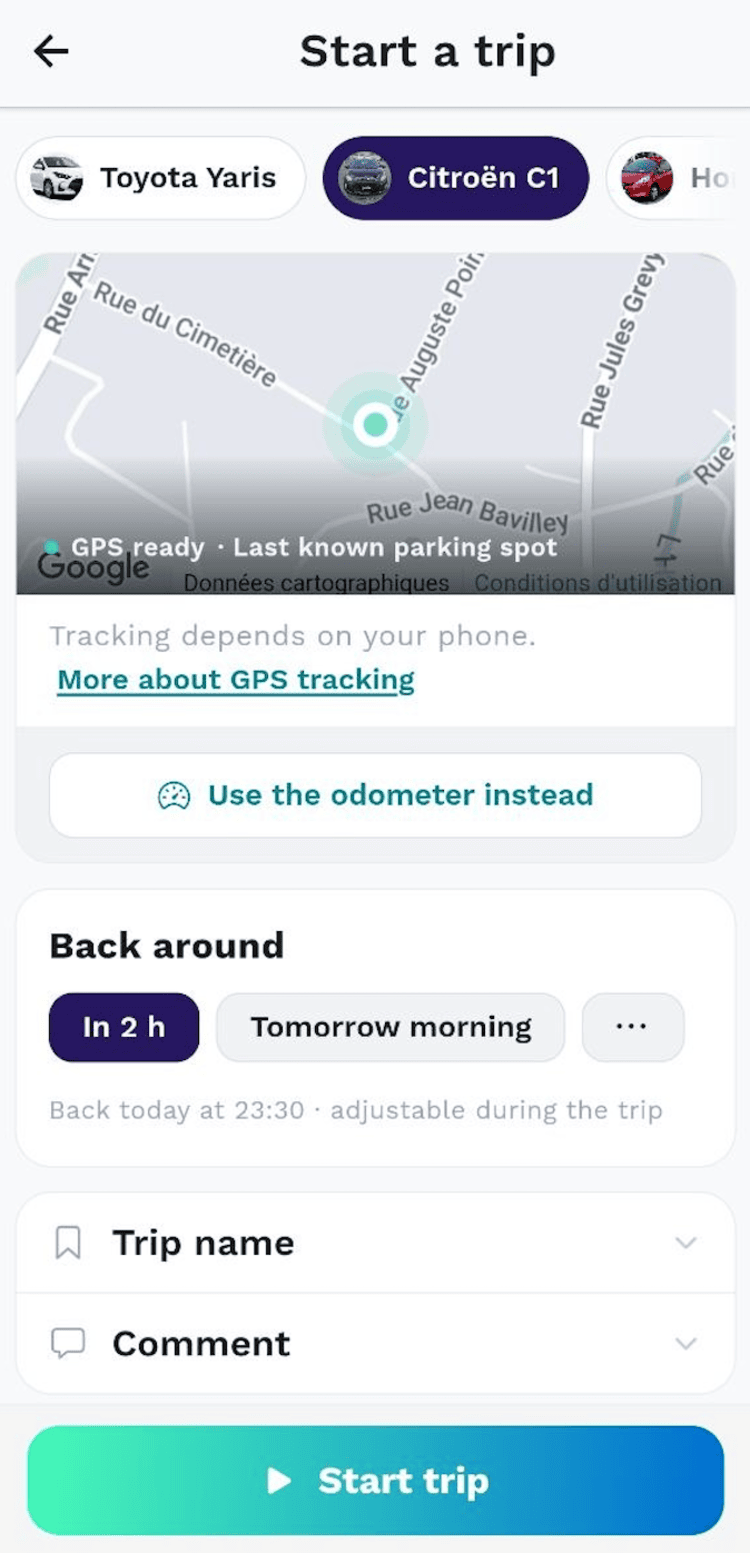
An alternative to reading the odometer: when you start a trip, the app offers GPS measurement by default, and a button switches back to the odometer entry. Nothing to install in the car, no tracking box.
-
Tracking only runs during the trip: it starts when you start the trip and stops when you close it. Between trips, the app records no location at all.
-
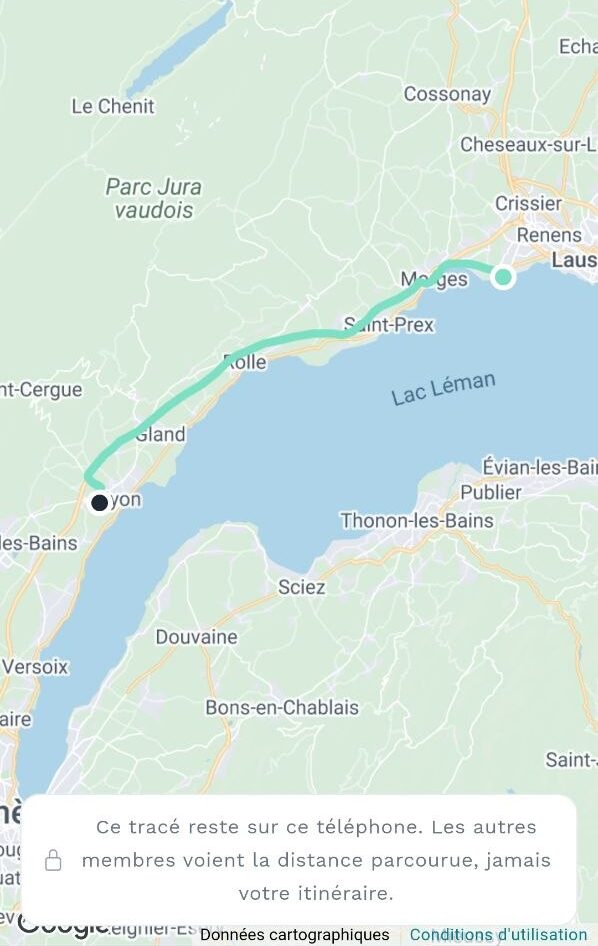
Your route never leaves your phone: the track stays on the device and is erased after 90 days. Only the distance joins the recorded trip your circle can see.
-
The parking spot is shared only if you confirm it when closing the trip, so the next driver can find the car.
-
It is an estimate, not a reference: expect 1 to 2 percent difference from the odometer, and you can correct the distance when you close the trip.
Why measure by GPS when the odometer exists?
The odometer reading is the most exact method, and it is the one the Co-oto trip logbook is built on. Its flaw: it asks for a gesture at the right moment, before leaving and again on arrival. One rushed departure, and the trip ends up reconstructed from memory.
When several people drive the same car, that gap costs twice: the trip is missing from the history, and cost sharing per mile or kilometer then rests on an estimate nobody can check.
GPS measurement answers that case: you start the trip, you drive, the app counts. It does not replace the odometer, it saves you from reading it when the moment is wrong.
From departure to closing, in three steps
GPS tracking fits into the usual flow of a trip, detailed on our how it works page. Only the way the distance is obtained changes.
1. You choose at the start
The start screen offers GPS measurement by default, with no odometer reading to type in, and a "Use the odometer instead" button for the days you would rather read it. The first time, a screen explains what is measured and what is shared, before any permission is requested.
2. The app counts while you drive
The distance updates live and keeps counting with the screen locked. A blue indicator on iOS, a "Trip in progress" notification on Android: tracking never hides.
3. You close the trip on arrival
Once the car has been still for a few minutes, the app offers to close the trip, never on its own. The distance goes in labeled "Measured by GPS", and stays editable.
What stays on your phone, what is shared
A history of routes is the most revealing data a mobility app can hold. Co-oto does not need it to compute a distance, so Co-oto does not collect it: only the resulting number joins the recorded trip.
Stays on your phone
- The track of your route, stored on this phone only
- The positions recorded during the trip, never sent to our servers
- Your route history, erased automatically after 90 days
- The track of a deleted trip, erased along with it
Shared with your circle
- The distance driven, exactly as if you had typed it from the odometer
- The duration and time of the trip, as for any trip
- The parking spot, only if you confirm it when closing the trip
- Nothing else: other members never see where you drove
GPS or odometer: which one to pick?
GPS measures the distance on the ground, the odometer what the vehicle displays: 1 to 2 percent apart. Harmless between people who know each other; for your accountant, the odometer remains the reference. The choice is made trip by trip, driver by driver.
At closing, the distance carries a "Measured by GPS" label and stays editable: your own reading always wins. In a tunnel or an underground garage, the app flags the hole in the signal and falls back to the odometer rather than smoothing it over.
The phone can interrupt tracking too: on Android, several manufacturers shut down background apps to save battery. Two settings prevent it, brand by brand, detailed just below.
GPS stopped mid-trip: what to change on your phone
When the measurement is cut short, Co-oto does not invent a distance: it says so when you close the trip and asks for the odometer reading instead. The cause is almost always the same, and so is the fix.
Two settings are involved. Android's own battery optimization first, which every phone has and from which Co-oto has to be exempt. Then the manufacturer's own manager, a second layer laid on top, where the app has to be allowed to keep running. One without the other rarely holds.
Android, brand by brand
The wording changes from one version to the next, the setting does not.
Samsung (One UI)
Settings > Battery > Background usage limits: Co-oto must appear neither in Sleeping apps nor in Deep sleeping apps. Then Settings > Apps > Co-oto > Battery > Unrestricted. If trips still stop, turn Adaptive battery off.
Xiaomi, Redmi, POCO (HyperOS, MIUI)
Settings > Apps > Co-oto: turn Autostart on, then set Battery saver to No restrictions. Locking the app in the recent apps list helps as well.
Huawei, Honor
Settings > Battery > App launch: turn Manage automatically off for Co-oto, then enable the three switches it reveals, Run in background among them.
OnePlus, OPPO, realme (OxygenOS, ColorOS)
Settings > Battery > Battery optimization > Co-oto > Don't optimize, and allow the app in the startup manager. On OnePlus, also turn off Deep optimization and Sleep standby optimization.
Google Pixel, Motorola, Nothing, Fairphone, Sony
The closest to stock Android, and the least aggressive: Settings > Apps > Co-oto > Battery > Unrestricted is usually enough.
On iPhone
iOS interrupts far less, and two settings cover it: in Settings > Privacy & Security > Location Services > Co-oto, pick While Using the App and leave Precise Location on. Without it the position is rounded and the distance drifts. During the trip, the blue indicator at the top of the screen confirms the measurement is running.
Brand by brand, screenshots included, Don't kill my app! keeps the reference list. And if nothing holds on your phone, the odometer entry stays available for every trip, with no setting to change.
The other use of GPS: finding the car
When a car changes hands during the week, the question is not "how many miles" but "where is it". The parking spot answers it: the driver saves where they parked, and the circle sees it on a map.
It is a point placed on purpose, not a tracker: no real-time position, no history of the vehicle's movements. After a GPS measurement, the app offers that point when you close the trip; you confirm it, or you share nothing.
In an underground garage, accuracy drops or the point is missing. That is the moment to use the circle chat to give the level and the bay number.

Who decides, in the circle?
The decision happens at two levels. The vehicle owner chooses whether to open GPS measurement to the circle, from the settings. Each driver then keeps control on their own phone: they give their consent or not, and they choose at the start of every trip.
One setting overrides the rest: if the circle has turned on "Odometer reading required", GPS measurement is not offered. That is consistent, since the two settings say the opposite of each other.
On phones only. GPS measurement is a mobile app feature. From the Co-oto Teams web console, trips are recorded from the odometer.
Pricing and trial
GPS measurement and the parking spot are part of the paid features. A single subscription per circle is enough: any member can take it out, and the people you invite have nothing to pay. The 21-day free trial includes them. Without a subscription, recording trips from the odometer stays available.
Frequently asked questions
Does Co-oto track my location all the time?
No. Tracking starts when you start a trip and stops when you close it; outside a trip, the app records no location. It asks for the "while using the app" permission, never the always-on one.
Can the other members of my circle see my route?
No. They see the distance driven, as if you had typed it from the odometer; the track stays on your phone. Only the parking spot can be shared, and only if you confirm it when closing the trip.
Where is my route stored, and for how long?
On your phone, and nowhere else. The track lets you look back at your route from the trip summary; it is erased after 90 days, and immediately if you delete the trip.
Is GPS measurement as accurate as the odometer?
No, and the app does not pretend otherwise: expect a 1 to 2 percent difference, the odometer remains the reference. You can correct the distance when closing the trip. Signal lost for too long or trip too short, and the app falls back to the odometer on its own.
Does it work with the screen locked or the app closed?
Yes, once the trip has started, with the screen locked as well as in the background. If tracking is interrupted, the app says so at closing time and asks for the odometer distance instead of inventing a number. A forgotten trip has its measurement stopped after twelve hours.
Does GPS drain my battery?
The sensor goes idle when the vehicle is stopped. Expect a few percent of battery per hour of driving.
Do I need a tracking box in the car?
No. Everything happens in the app, on the driver's phone: no hardware to install, and an older car without recent onboard electronics works just as well.
Is GPS tracking included in the free plan?
No, it is a paid feature, like the shared parking spot. It is included in the 21-day free trial, then in the paid plans. Without a subscription, recording trips from the odometer stays available.